
Download Vidmat APK
VidMate is a free multimedia downloader designed for Android devices that has been around since 2016. It allows users to download videos and music directly to their phone or tablet from hundreds of websites, including major platforms like YouTube, Facebook, Instagram, TikTok, and Vimeo.
The app isn’t just a downloader; it also includes a built-in web browser and a media player, creating an all-in-one hub for finding, downloading, and playing content offline.
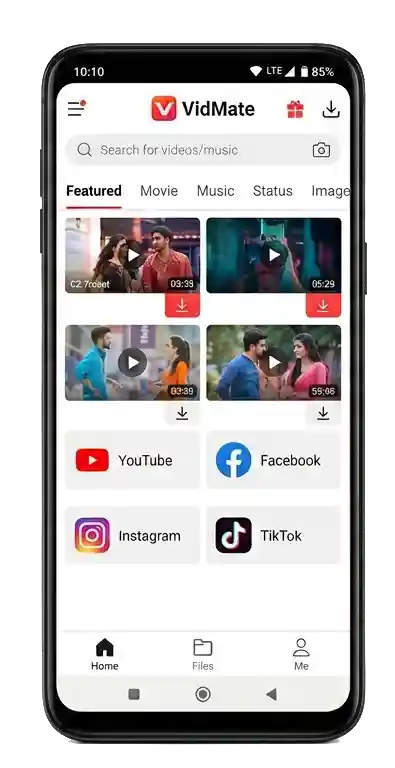

VidMate is one of the most paradoxical applications in the mobile world. On the surface, it’s a free, all-in-one media downloader that lets you save videos from YouTube, Facebook, Instagram, TikTok, and hundreds of other sites directly to your device for offline viewing. With over 690 million downloads worldwide, its popularity is undeniable, people love the freedom of watching their favorite content without an internet connection.
What Is VidMate? (And Why It’s Not on Google Play)
VidMate is a multimedia downloader originally developed for Android. It allows users to search for, stream, and download videos and music from a vast range of platforms not just YouTube, but also Facebook, Instagram, TikTok, Vimeo, Dailymotion, Tumblr, SoundCloud, WhatsApp, and more than 1,000 other sites.
Crucially, VidMate is not available on the Google Play Store. Google’s policies prohibit apps that facilitate downloading from YouTube, so the developer has always distributed VidMate as a standalone APK file, requiring users to manually enable “Install from Unknown Sources” on their Android devices. In 2023, the official VidMate service was discontinued, meaning the app no longer receives updates or official support. Despite this, the APK continues to circulate on third-party sites, and users still rely on it for offline media downloads—albeit with increasing risk.
The Rise and Fall: A Brief History Of Vidmate
VidMate was launched in the early 2010s by VidMate Studio, a developer whose exact corporate identity remains opaque. The app quickly gained traction due to two factors:
- first, it supported an unusually wide range of websites compared to competitors like TubeMate or Snaptube;
- second, it offered a built-in browser that allowed users to discover and download content without switching between apps.
By 2019, VidMate had surpassed 690 million installs, making it one of the most downloaded Android apps outside the Play Store ecosystem. However, that same year, a landmark investigation by cybersecurity firm Upstream (Secure-D) exposed that VidMate – along with its popular competitor Snaptube was engaging in hidden ad fraud and unauthorized subscription sign-ups. The report revealed that the app delivered invisible ads, generated fake clicks, and siphoned off users’ private data, all without their knowledge. Upstream claimed to have blocked over 128 million suspicious transactions originating from VidMate that could have cost users in Egypt, Brazil, Myanmar, and other countries more than $150 million in unwanted mobile charges.
In 2023, VidMate officially ceased operations. The exact reasons were not publicly declared, but the combination of Google Play bans, mounting legal pressure, and the widening fallout from the Secure-D exposé almost certainly contributed to the shutdown.
Core Features: What VidMate Can Actually Do
Despite its troubled legal status, VidMate remains a feature-rich application. Many of its capabilities exceed those of conventional downloaders.
Multi-Platform Video & Audio Downloading
The core feature is the ability to paste a video URL (or search for one within the app) and download it in various resolutions and formats. Users can choose between 3GP, AVI, MP4, MOV, FLV for video, or extract only the audio as MP3 or M4A. Resolution options range from a tiny 144p (for devices with minimal storage) up to 1080p Full HD and, where the source allows, 4K.
Built-in Media Player
VidMate doubles as a powerful media player. It supports essentially every common video format – MKV, MP4, M4V, AVI, MOV, 3GP, FLV, WMV, RMVB, TS and can play 4K content smoothly via hardware acceleration. The player includes gesture controls for volume, brightness, and playback progress, plus a floating pop-up window mode that lets you watch videos while using other apps.
Live TV Streaming
One of VidMate’s most distinctive features is live TV broadcasting. The app aggregates free-to-air television channels and live sports events from around the world, turning it into a portable TV. This feature alone sets it apart from most other video downloaders, which focus purely on on-demand content.
Video-to-MP3 Converter
VidMate can extract audio from any video file, saving it as an MP3. This is especially useful for creating offline playlists, ringtones, or simply listening to music without needing a video stream.
Batch Downloads & Download Queue
The app allows multiple simultaneous downloads and maintains a download queue. Users can set up a list of videos and let VidMate process them in the background – even while using other apps.
Built-in Browser & Content Discovery
Instead of requiring users to copy-paste links from an external browser, VidMate includes an integrated web browser. This browser is pre-configured to recognize supported video sites, so users can navigate directly to their favorite platforms, find content, and download it all within a single app.
Customizable Settings
VidMate offers a range of customization options that few downloaders provide:
- Default video quality selection (e.g., always download in 720p).
- Restricted mode to filter adult content.
- Popup/floating play mode for multitasking.
- Automatic playback stop timer for the built-in music player.
- Night mode and playback speed control.
How to Install VidMate (If You Still Want To)
Since VidMate is no longer maintained, installation is entirely manual.
For Android:
- Enable “Install from Unknown Sources” in your phone’s security settings.
- Download the latest available APK
- Open the downloaded APK file and follow the on-screen installation prompts.
- Once installed, launch the app and grant necessary permissions.
For PC (Windows/Mac):
- Install an Android emulator such as BlueStacks or Nox Player.
- Download the VidMate APK onto your computer.
- Open the emulator, drag the APK file into its window, and install.
- VidMate will appear as a standard app within the emulator.
The Dark Side: Security Risks & Privacy Concerns
This is the section that most tech reviews gloss over. VidMate’s security story is alarming.
The Secure-D Exposé (2019)
Researchers at Upstream’s Secure-D platform analyzed VidMate and discovered a hidden software component that:
- Delivered invisible ads in the background, consuming user data without consent.
- Generated fake clicks on advertisements.
- Signed users up for unauthorized premium subscriptions, silently deducting money from prepaid balances.
- Collected sensitive device identifiers, including IMEI and IMSI numbers.
Upstream estimated that the fraudulent activities originating from VidMate could have cost users over $150 million globally.
Trojan-Infected Versions
Further security analyses revealed that some VidMate APK distributions were bundled with Trojans capable of:
- Stealing contacts and SMS messages.
- Accessing the list of installed applications.
- Attempting to elevate system privileges for deeper device control.
- Executing code after device reboot.
The Mango SDK Connection
VidMate and its competitor Snaptube both integrated a software development kit called Mango SDK. This SDK was identified as the core mechanism enabling the background fraud. Even after the initial exposure, the same SDK reappeared in other popular apps, demonstrating how deeply embedded these practices are in the “free” app ecosystem.
Unofficial & Fraudulent Websites
Because the official VidMate website is no longer active, numerous fake “VidMate” sites have emerged. These sites often mimic official branding but distribute tampered APKs containing malware, aggressive adware, or bundled unwanted applications. Users searching for VidMate today face a minefield of malicious downloads.
Legal Considerations
Using VidMate to download content occupies a legal grey area. Key points:
- Downloading copyrighted material (movies, music videos, TV shows) without permission violates YouTube’s Terms of Service and similar platform policies, and may infringe copyright law in many jurisdictions.
- Downloading your own content, royalty-free videos, or material in the public domain is generally permissible.
- VidMate itself is not illegal to possess, but the app is not officially licensed or endorsed by any major social media platform.
- Some countries have laws specifically targeting apps that circumvent streaming service protections.
In short, the legal risk depends heavily on what you download and where you live.
VidMate vs. Alternatives: What’s the Best Option in 2026?
Given VidMate’s discontinuation, many users have migrated to alternatives. Here is how it stacks up against the competition:
| Feature | VidMate | Snaptube | NewPipe | 4K Video Downloader |
|---|---|---|---|---|
| Platforms Supported | 1,000+ sites | YouTube, Facebook, Instagram, etc. | YouTube, PeerTube, SoundCloud | YouTube, TikTok, Vimeo, etc. |
| Live TV Streaming | Yes (built-in) | No | No | No |
| Built-in Browser | Yes | Yes | No | No |
| Batch Downloads | Yes | Yes | Limited | Yes |
| Open Source | No | No | Yes (F-Droid) | No |
| Google Play Store | No (discontinued) | No (removed) | Yes (via F-Droid) | Desktop only |
| Active Development | No (stopped 2023) | Limited | Yes (active) | Yes (active) |
| Security Track Record | Severe warnings | Moderate warnings | Clean (open source) | Clean |
Snaptube is the most direct alternative, but it shares the same Mango SDK fraud history. NewPipe is an open-source YouTube client that does not use Google’s proprietary APIs and is available via F-Droid; it prioritizes privacy but lacks VidMate’s multi-platform breadth. 4K Video Downloader is a desktop-oriented tool with a clean reputation, but it requires a computer.
Little-Known Tips & Tricks
These are details you won’t find in most “VidMate guide” articles:
- Change the language to Chinese (中文) or other languages via the settings menu. VidMate supports multiple interface languages, but this option is buried deep in the settings.
- Save videos directly to an SD card by selecting the external storage path in download settings, avoiding internal storage bloat.
- Use Wi-Fi only mode to prevent accidental mobile data consumption when downloading large HD files.
- Clear the app cache weekly to remove residual ad-tracking data and free up space.
- Block ads system-wide using a DNS-based ad blocker (like AdGuard) rather than relying on in-app settings.
- Extract audio from Facebook or Instagram videos—a feature that most platforms don’t natively support—by pasting the link into VidMate and selecting MP3 as the output format.
Conclusion: Is VidMate Still Worth Using?
VidMate was and in some ways still is a remarkably capable media downloader. Its support for over a thousand sites, live TV streaming, built-in browser, and batch downloading made it a standout application in a crowded market. For users in regions with limited internet connectivity, the ability to cache high-quality content offline was genuinely transformative.
However, the risks are now too significant to ignore. The app is discontinued, unmaintained, and removed from official stores. Multiple security investigations have confirmed that versions of VidMate contained hidden ad fraud mechanisms, Trojan malware, and aggressive data collection. The ecosystem of third-party APK sites that distribute VidMate today is riddled with fraudulent copies.
Bottom line: If you have an old version installed and it still works for downloading your own content, use it cautiously. If you’ve never installed it before, it’s wiser to choose a modern, actively maintained, and open-source alternative like NewPipe or a reputable desktop downloader. The convenience VidMate offers no longer outweighs the very real security and legal liabilities it carries.